React Prerequisites
Part 1 of the React Internals series. A practical primer on components, elements, hosts, React's trigger, render, commit, and paint cycle, effects, the core hooks, and the immutability rules that let React skip work.
Ben Houston • • 6 min read
This is the starting point for the React Internals series. It assumes you can build React components and want sharper names for the machinery those components use.
React makes a promise that feels simple in application code: give React the current props, state, and context, and it will make the screen match.
That promise depends on a small vocabulary. If "render" sometimes means a component function call, sometimes a DOM update, and sometimes browser paint, React internals become hard to follow. This primer pins those words down before the rest of the series looks at fibers, scheduling, optimization, and renderers.
Components, Elements, and Hosts#
A component is the function you write:
function Greeting({ name }: { name: string }) {
  return <h1>Hello, {name}</h1>;
}
An element is the plain object React receives when that function returns JSX. It describes what you want, not what already exists on screen. A component can return an element for another component, such as <Greeting />, or a host element, such as <h1 />.
A host is the platform React updates. In a browser, the host is the DOM. In React Native, the host is a native view tree. In React Three Fiber, the host is a Three.js scene graph.
React has two broad jobs:
- The reconciler decides what changed in the React tree.
- A renderer applies that change to a host.
Most React rules start with that split. Your component describes UI. React compares descriptions. The renderer changes the platform.
The Inputs to Render#
A component renders from three public inputs:
- Props come from the parent.
- State belongs to the component.
- Context comes from the nearest matching provider above the component.
When one of those inputs changes, React has a reason to revisit part of the tree. It does not ask your code which DOM nodes exist or which attributes need updating. Your component returns the next description, and React works out how to move from the old description to the new one.
Trigger, Render, Commit, Paint#
React's update cycle has four useful steps.
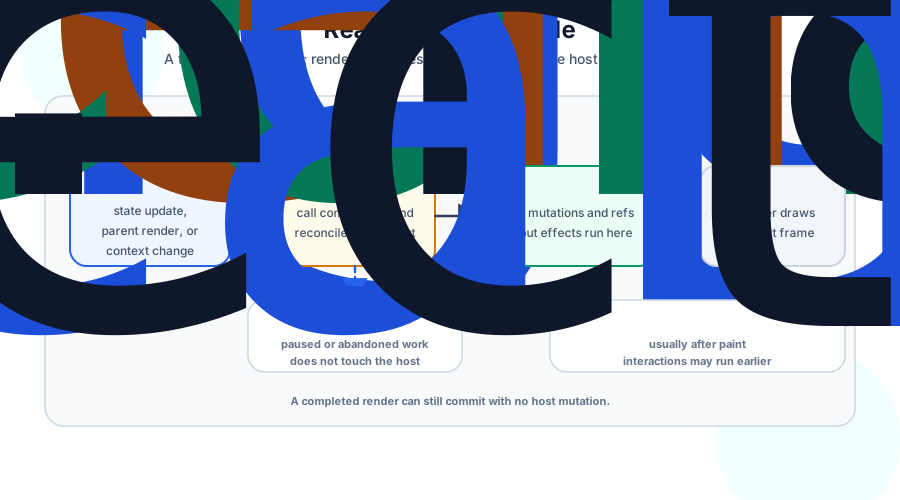
A trigger starts the update. Common triggers include the initial root render, requesting a state update, a parent rendering again (possibly with new props), or changing a context provider value.
During render, React calls components to calculate the next UI description. Rendering must stay pure because React can call a component, pause the work, throw the work away, and call it again. A render should compute JSX from inputs. It should not change the DOM, subscribe to a socket, write to storage, or start a timer.
During commit, React applies the finished work to the host. In the browser, that means inserting, updating, or removing DOM nodes, attaching refs, and running layout effects. React only commits work that finished. If a render gets interrupted and abandoned, the user keeps seeing the last committed UI.
After React commits DOM changes, the browser can paint. Painting is the browser drawing pixels. React does not own that step, but React's choices affect how much work the browser has to do.
This language matters because a component can render without causing a DOM mutation. React may call a component, compare the result with the previous result, and find nothing to change in the host.
Effects Run Outside Render#
React separates render from side effects.
useEffect registers passive work. React stores the effect callback and dependency array during render, then runs the callback after the commit. In most cases, passive effects run after the browser paints. For discrete user interactions, React may run them before paint when the result must be observed by the event system.
useEffect(() => {
  const unsubscribe = store.subscribe(forceUpdate);
  return unsubscribe;
}, [store]);
The cleanup function is the value returned by the previous effect callback. On a later commit where the dependencies changed, React runs the previous cleanup before it runs the next callback. React also runs cleanup when the component unmounts. In development, Strict Mode performs an extra setup-and-cleanup cycle to expose effects that do not clean up correctly.
useLayoutEffect runs earlier. React runs layout effects during the commit after it has updated the host tree and refs, but before the browser paints. At that point, a DOM ref points at the committed node, so code can measure layout:
useLayoutEffect(() => {
  const box = ref.current?.getBoundingClientRect();
  setTooltipHeight(box?.height ?? 0);
}, []);
If a layout effect schedules state, React processes that update synchronously before paint. That is why layout effects can measure a node, adjust state, and avoid showing an intermediate frame. The tradeoff is that they block paint while they run, so most effects should use useEffect instead.
The Core Hooks#
useState gives a component state and an update queue. Calling the setter enqueues an update and requests another render. If the next state is Object.is-equal to the current state, React can skip re-rendering the component and its children.
const [count, setCount] = useState(0);
useRef gives a component a stable object.
const inputRef = useRef<HTMLInputElement | null>(null);
Changing inputRef.current does not schedule a render. A ref is useful for values that must survive renders but should not drive the UI.
useContext reads a provider value. If that value changes, React can render consumers that read it, even when their props stayed the same.
const theme = useContext(ThemeContext);
useMemo and useCallback usually preserve identities between renders when their dependencies match. useMemo caches a value. useCallback caches a function identity.
const options = useMemo(() => ({ compact: true }), []);
const onSelect = useCallback((id: string) => {
  console.log(id);
}, []);
These hooks are optimization tools and identity tools. They do not make slow work disappear. They help React and your own dependency arrays see that a value is the same as last time. React may discard their caches in specific cases, so application correctness should not depend on either hook preserving a value forever.
Immutability and Identity#
React often compares values with Object.is. For primitives, that behaves like the comparison you expect:
Object.is(3, 3); // true
Object.is('dark', 'dark'); // true
For objects, arrays, and functions, React compares identity:
Object.is({ compact: true }, { compact: true }); // false
Two objects with the same fields are still different objects. This is why immutability matters in React. When you replace an object instead of mutating it in place, React can see that the identity changed. When you keep the same object identity for a value that did not change, React can skip work at identity-sensitive boundaries such as state and context comparisons, memoized components, and Hook dependency arrays.
setUser((user) => ({ ...user, name: nextName }));
That update creates a new state object while shallowly preserving the values—and any nested object references—of fields that did not change.
Next Up: React Fibers#
The next article goes under the surface and looks at the data structure that makes React work: React Fibers.