Introducing MTLX — MaterialX Tools for the Web
MTLX is a TypeScript/JavaScript MaterialX toolkit — a library, CLI, web viewer, and VS Code extension — for parsing, validating, packaging, and transforming .mtlx and .mtlx.zip files without the official C++ tooling.
Ben Houston • • 7 min read
MaterialX describes materials as portable shading graphs. With Three.js able to load those graphs, .mtlx files are useful inputs for web applications. I wanted JavaScript tools for inspecting, checking, and packaging them without integrating the reference MaterialX C++ library or a WebAssembly build.
I just shipped mtlx, a TypeScript/JavaScript MaterialX toolkit whose core runs in the browser without Node.js or native dependencies, with Node.js tools available for local workflows. It's a library, a CLI, a web viewer, and a VS Code extension, all built on the same core.
Why now?#
Two things pushed me to build this.
First, I recently worked on MaterialX support in Three.js. The importer translates supported MaterialX graphs into TSL node materials for WebGPURenderer, including its WebGL2 fallback. Coverage depends on the nodes and resources in the document; previewing a material does not guarantee identical rendering in another application. Loading a MaterialX file takes just a few lines:
import { MaterialXLoader } from 'three/addons/loaders/MaterialXLoader.js';

const loader = new MaterialXLoader().setPath( 'materials/' );
const { materials } = await loader.loadAsync( 'standard_surface_brass_tiled.mtlx' );
You can see it live in the Three.js MaterialX example. The MaterialXLoader documentation describes the returned materials and translation log. That work makes the tooling around MaterialX much more useful to me.
Second, I wanted a workflow that fits JavaScript projects: install a package, check a file, repackage its textures, and preview the result. The reference library has a much broader role; mtlx focuses on these everyday tasks with a shared core for browser and Node applications.
What mtlx does#
mtlx works with two things: loose .mtlx documents and .mtlx.zip archives — a single-file container for a MaterialX document plus its textures and included resources. Everything in the toolkit is built around moving cleanly between those two forms.
Validation#
There are a lot of subtly broken MaterialX files out in the wild — wrong node types, missing ports, structural issues a DCC will silently paper over but that trip up a strict parser. mtlx check runs selected MaterialX checks, with glob support so you can check a whole directory in one pass. It defaults to basic node and port checks; add structure, type, and resource checks explicitly for a broader CI check:
mtlx check "materials/*.mtlx" --rules basic structure types resources --strict
check exits non-zero on error-level issues; --strict also fails on warnings. These checks can gate a build, but cover selected rules rather than full MaterialX conformance or shader compilation.
Packaging as a build step#
This turned out to be one of the more useful parts of the project. mtlx x (transform) can pack a loose .mtlx and its textures into a single .mtlx.zip, unpack a .mtlx.zip back out, or take a whole glob of materials and combine them into one archive. Combining merges the documents and carries their resources along, renaming colliding resource paths. Top-level names, including material and nodegraph names, must be unique across inputs; combining does not deduplicate identical texture bytes:
# pack a .mtlx (plus its textures) into a single .mtlx.zip
mtlx x material.mtlx -o material.mtlx.zip

# unpack a .mtlx.zip back into a .mtlx with textures alongside it
mtlx x material.mtlx.zip -o out/material.mtlx

# combine multiple materials into a single .mtlx.zip
mtlx x "{metal,wood,glass}.mtlx" -o combined.mtlx.zip

# prepare a whole directory for the web: resize textures and convert non-web formats
mtlx x "materials/*.mtlx" -o out/ --profile web
Paired with check, that makes validation and packaging into a real build pipeline for materials, treating them as build artifacts the way glTF Transform treats glTF assets.
Web-focused transforms#
Preparing a material for the web usually means shrinking it: capping texture resolution and switching formats to something browsers handle efficiently. mtlx bakes that in as a first-class option, directly inspired by Don McCurdy's glTF Transform:
mtlx x material.mtlx -o material.mtlx.zip --profile web
# explicitly convert textures to WebP:
mtlx x material.mtlx -o material.mtlx.zip --max-image-size 2048 --image-format webp
The web profile caps the longest texture edge at 2048 pixels. It preserves WebP, PNG, JPEG, and AVIF formats, leaves those textures untouched when already within the size limit, and converts other supported source formats to WebP. Explicit --image-format webp requests conversion even for otherwise compatible formats.
The core library#
Everything above is also available as a library, for scripting your own transforms or embedding mtlx in a larger pipeline. The root mtlx-core entry point is pure and browser-safe, with no filesystem or native imports; Node helpers and texture processing (via sharp) live under separate Node-only entry points. This example uses those Node.js helpers:
import { transform } from 'mtlx-core';
import { loadMaterialXPackage, writeMaterialXPackage } from 'mtlx-core/node';
import { resizeTextures } from 'mtlx-core/textures';

// Load a .mtlx (with its textures) or .mtlx.zip into memory.
const pkg = await loadMaterialXPackage( 'material.mtlx' );

// Apply transforms in order.
await transform( pkg, resizeTextures( { maxImageSize: 2048, imageFormat: 'webp' } ) );

// Write back out as either format.
await writeMaterialXPackage( pkg, 'material.mtlx.zip' );
Seeing what you're working with#
A validator that just prints error strings only gets you so far — sometimes you need to look at the material. mtlx offers browser, CLI, and editor previews.
The online viewer, built on the same Three.js MaterialX loader mentioned above, lets you drag and drop a file (or load one from a URL) and inspect it directly in the browser: 3D preview, IBL and exposure controls, bloom, ambient occlusion, and tone mapping. Document checks, resource checks, and preview status are reported separately. URL-loaded materials can be shared with a viewer link, provided the recipient can access the source and its resources. A dropped loose .mtlx cannot access sibling textures, so use a .mtlx.zip containing its dependencies or a browser-accessible URL for textured materials.
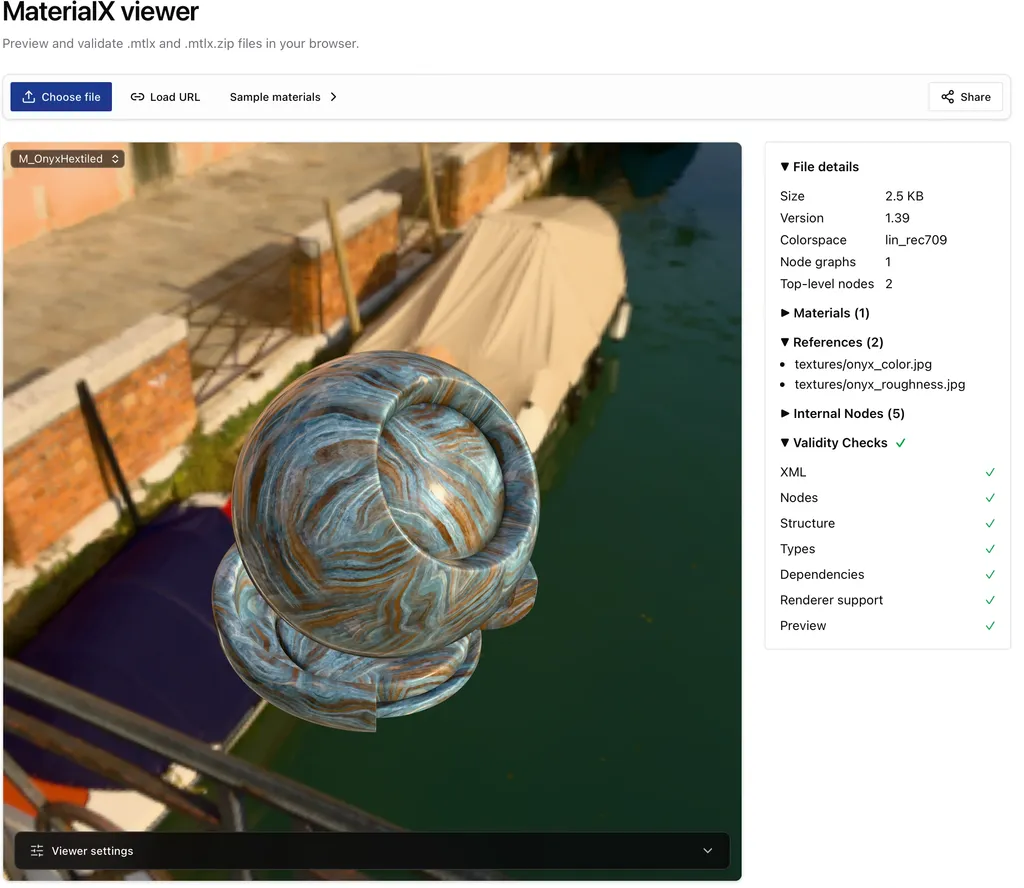
The CLI also provides a local browser preview using the shared rendering scene:
mtlx view material.mtlx
That serves the material and files in its directory from a local server bound to 127.0.0.1, then opens your browser. No material upload is required.
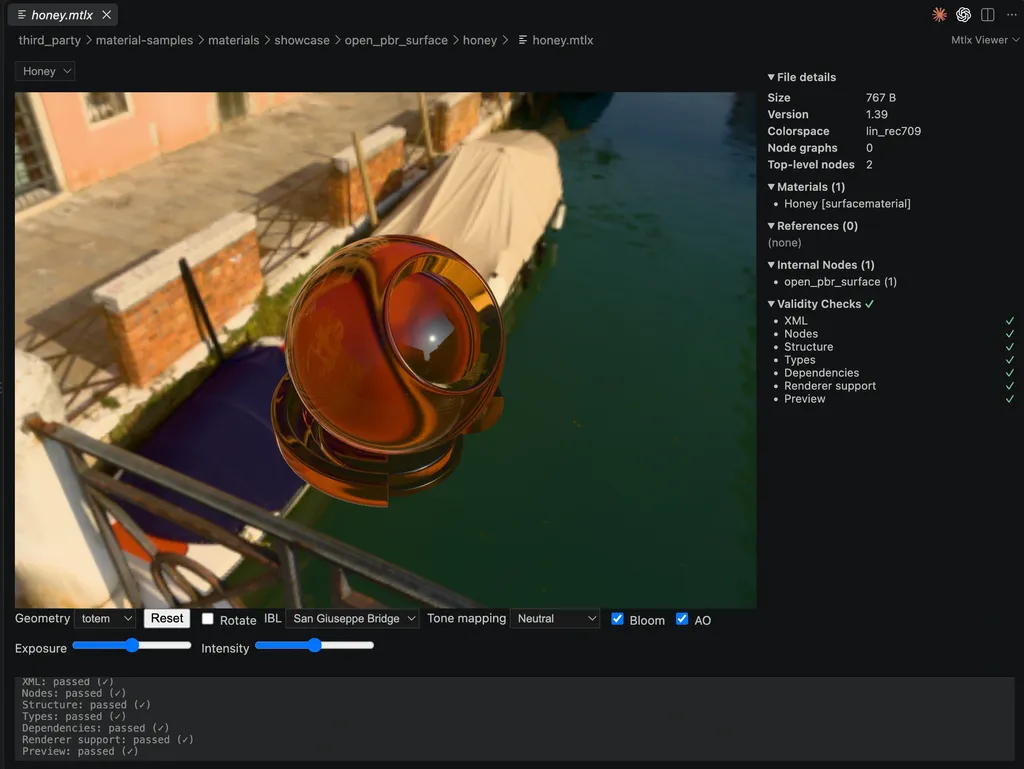
For editor-native workflows, the Mtlx Viewer VS Code extension brings the shared preview and inspection tools into desktop VS Code. It checks all core rule groups and refreshes previews when saved source files or resources change. A right-click context-menu action converts between .mtlx and .mtlx.zip, carries textures along, preserves existing destination documents by choosing a new filename, and reports conversion failures. The preview's validation is separate from conversion.
Try it#
- Online viewer: mtlx.ben3d.ca/viewer — try the Onyx Hextiled sample directly
- CLI:
npm install -g mtlx-cli - Library:
npm install mtlx-core - VS Code extension: mtlx.ben3d.ca/extension
- Source: github.com/bhouston/mtlx (MIT licensed)
It's all open source, and I'd love issues, PRs, or just word that it's useful to you. The one piece I'm still weighing is a full MaterialX editor to sit alongside the viewer — if that's something you'd use, let me know.
This work is sponsored by Land of Assets.