React Beyond the DOM
React prioritizes and interrupts fiber work, coordinates Suspense, and applies one reconciler to DOM, native, and Three.js targets through renderer host configs.
Ben Houston • • 5 min read
The second article in the React Internals series.
Part 1: How React Renders covered the core structure: React stores render work in fibers, keeps current and work-in-progress trees, and attaches hook state to the component fiber by position.
That structure gives React room to schedule. Because work lives in fibers instead of one long JavaScript call stack, React can choose which updates run first, pause a subtree that is waiting on data, and let different renderers commit the same reconciler output to the DOM, native views, or a Three.js scene.
Concurrency Means Interruptible Rendering#
Before React's concurrent renderer, a render was effectively synchronous from the browser's point of view. Once React started walking a large tree, the main thread stayed busy until React finished. During that time, the browser could not process input, paint, or run animation frames.
Concurrent rendering changes the scheduling model. React can split rendering into units of fiber work, check whether the browser needs control back, then continue later.
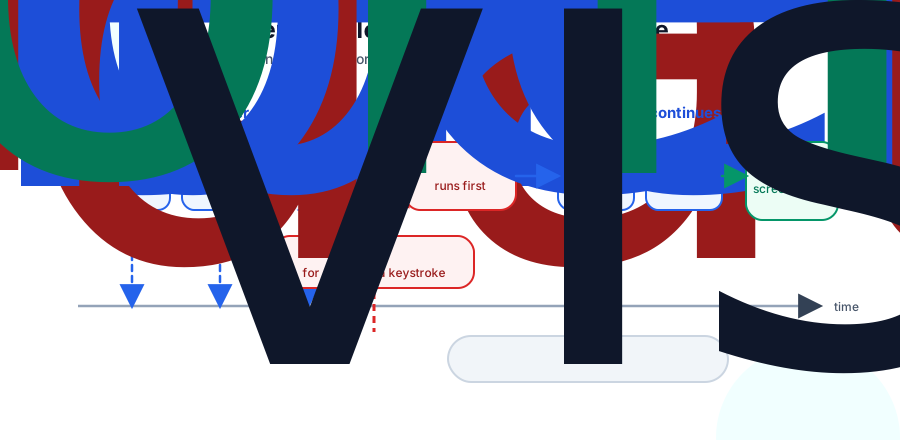
The current UI stays on screen while React prepares the next tree. If higher-priority work arrives before the lower-priority render commits, React can interrupt the in-progress render and handle the urgent update first.
This is why the fiber structure matters. React can stop between fibers because the tree stores enough pointers to resume the traversal. A deep recursive render would tie progress to the JavaScript call stack, which gives React much less control.
Priority Lanes#
React does not treat every update as equal. Typing into an input should feel immediate. Re-rendering a filtered 10,000-row result list can wait a few frames.
React models update priority with lanes. Lanes let React group related updates and decide which work should render first.
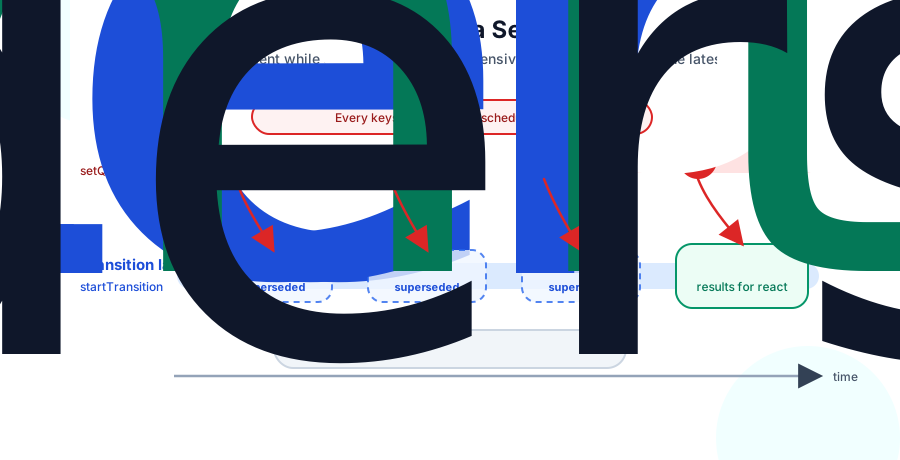
For application code, the most visible API is useTransition:
function SearchBox({ allItems }: { allItems: string[] }) {
  const [query, setQuery] = useState('');
  const [results, setResults] = useState<string[]>(allItems);
  const [isPending, startTransition] = useTransition();

  function onChange(next: string) {
    setQuery(next);

    startTransition(() => {
      setResults(allItems.filter(item => item.includes(next)));
    });
  }

  return (
    <div>
      <input value={query} onChange={event => onChange(event.target.value)} />
      {isPending ? <Spinner /> : <ResultsList items={results} />}
    </div>
  );
}
The input update stays urgent. The filtered results update becomes transition work. If the user types again while React is rendering the results, React can abandon or restart that lower-priority work with the newer query.
The expensive render still costs CPU. Interruptibility keeps the input responsive.
Suspense Pauses a Subtree#
Suspense uses the same render machinery for a different reason: a subtree cannot finish yet.
In modern React, a component can suspend by throwing a Promise during render. You usually see this through framework data APIs, React's use() API, or a library that integrates with Suspense. React catches the Promise, finds the nearest <Suspense> boundary, and renders the boundary's fallback for that subtree.
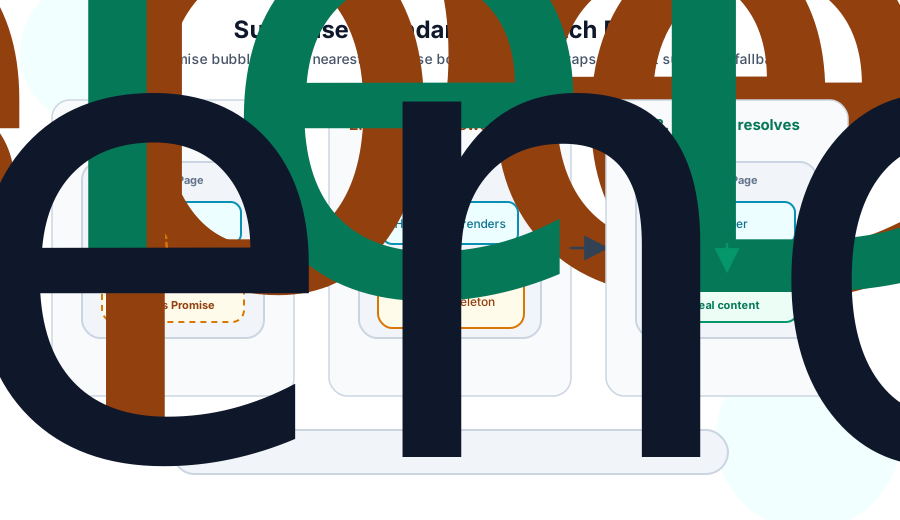
The pattern looks like this:
function ProfilePage({ userId }: { userId: string }) {
  return (
    <Suspense fallback={<ProfileSkeleton />}>
      <ProfileDetails userId={userId} />
    </Suspense>
  );
}

function ProfileDetails({ userId }: { userId: string }) {
  const user = use(fetchUser(userId));
  return <h1>{user.name}</h1>;
}
When fetchUser(userId) has not resolved, ProfileDetails suspends. React renders ProfileSkeleton at the boundary and can continue work outside that boundary. When the Promise resolves, React retries the suspended subtree.
Nested Suspense boundaries work because each boundary marks a place where React can pause one part of the tree without blocking everything around it. A small boundary gives you a small fallback. A large boundary gives you a larger loading region.
One Reconciler, Many Renderers#
The reconciler knows about fibers, hooks, lanes, Suspense, and diffing. Host renderers know how to create DOM nodes, native iOS views, and Three.js meshes.
React delegates platform work to a renderer. Each renderer provides a host config, which implements operations such as creating an instance, appending a child, applying prop updates, and removing an instance.
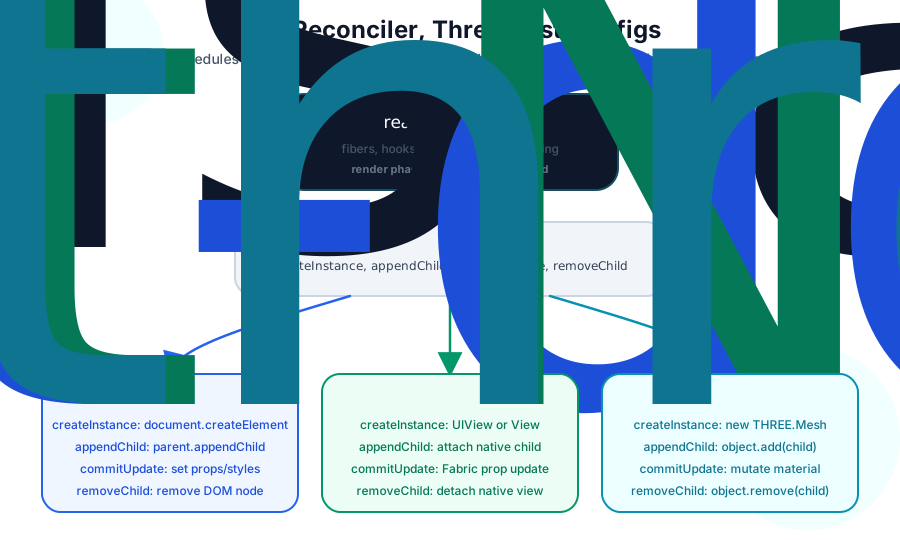
A simplified host config looks like this:
type HostConfig<Instance, Props> = {
  createInstance: (type: string, props: Props) => Instance;
  appendChild: (parent: Instance, child: Instance) => void;
  removeChild: (parent: Instance, child: Instance) => void;
  commitUpdate: (instance: Instance, oldProps: Props, newProps: Props) => void;
};
react-dom implements those methods with browser APIs. createInstance calls document.createElement. appendChild attaches DOM nodes. commitUpdate sets attributes, properties, styles, and event handlers.
React Native implements the same idea against platform views. A <View> maps to a native view, and prop updates become native layout and rendering updates through Fabric in the New Architecture.
react-three-fiber maps React host instances to Three.js objects. A <mesh> becomes a THREE.Mesh. Appending a child calls .add() on an Object3D. Prop updates mutate Three.js objects and materials.
The reconciler sees all of these as host instances. It decides that a child moved, a prop changed, or a subtree needs deletion. The renderer turns those decisions into platform operations.
The Useful Mental Model#
React's surface APIs make more sense when you connect them back to the structure underneath.
Keys preserve fiber identity. Hook order preserves hook state. Transitions put updates into lower-priority lanes. Suspense boundaries give React a defined place to show a fallback while a subtree waits. Host configs let the same reconciler drive the DOM, native views, and WebGL scene graphs.
You can write React well without memorizing every internal field. The core model is enough: React renders by preparing a fiber tree, scheduling that work by priority, and committing platform-specific mutations through a renderer. Most of React's rules are consequences of that design. The next question is how React avoids work in large trees, which is the subject of How React Skips Work.