React Skips: How Rendering Optimization Works
Part 4 of the React Internals series. React can skip component calls, reuse finished subtrees, and avoid host mutations when props, state, context, and output prove the work is unchanged.
Ben Houston • • 8 min read
This is Part 4 of the React Internals series. It builds on React Scheduling, which covered lanes, transitions, and Suspense.
Scheduling asks when React should work. Optimization asks when React can skip work.
The answer depends on which kind of work you mean. React can skip calling a component. It can reuse a finished fiber subtree. It can render a component and still avoid host mutations because the output matches the last committed output. Those skips save different costs.
Why a Fiber Renders#
A fiber renders when React has a reason to revisit it. Common reasons include:
- Its own state queue has an update.
- Its parent renders and passes new props or new children.
- A context value it reads has changed.
- React needs to retry suspended or interrupted work.
The parent case surprises people. By default, when a parent renders, React calls its child components again. JavaScript functions can produce different output each time they run, and React does not assume the child is unchanged unless it has proof.
function ProductPage({
  product,
  onSelect,
}: {
  product: Product;
  onSelect: (id: string) => void;
}) {
  return (
    <Details
      product={product}
      options={{ compact: true }}
      onSelect={onSelect}
    />
  );
}
ProductPage creates a new options object on every render. Even if product stayed the same, the child receives a new object identity.
Three Places React Can Skip#
React's work has stages. A skip at one stage does not imply a skip at every stage.
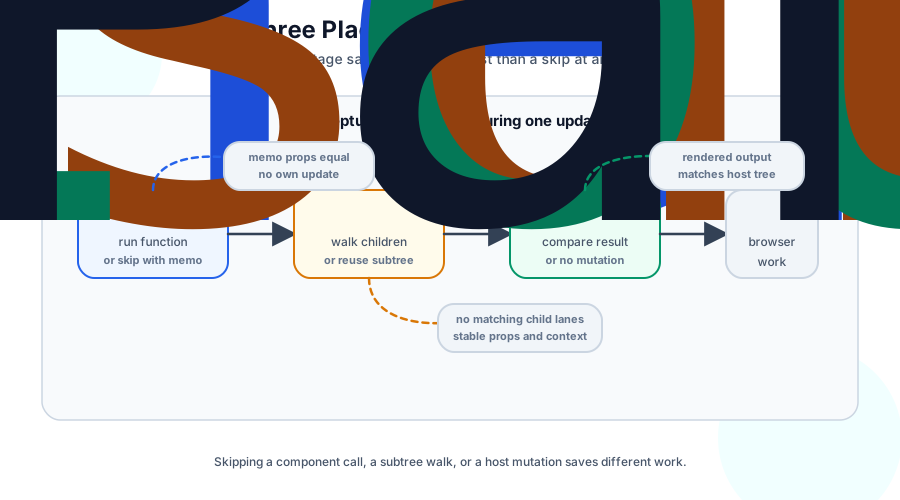
React can skip a component call when a memoized component's props compare equal and no state or context update reaches it. That saves JavaScript work inside the component. If no descendant has pending work, React can skip its subtree too. If a descendant does have pending work, React can traverse to it without calling the memoized ancestor again.
React can reuse a fiber subtree when lanes, props, and context dependencies prove that subtree cannot affect this render. That saves a walk through children.
React can skip host mutations when render output matches the last committed host output. A component may still run, but the DOM does not change.
These are separate wins. Skipping a component call helps when the component or its child tree is expensive. Skipping host mutations helps the browser. Neither fixes a slow network request or a slow effect.
memo Adds a Prop Comparison#
React.memo asks React to reuse a component's last rendered result when its props compare equal. By default, React compares each prop with Object.is.
const Details = memo(function Details({
  product,
  options,
  onSelect,
}: {
  product: Product;
  options: { compact: boolean };
  onSelect: (id: string) => void;
}) {
  return (
    <ExpensiveDetails
      product={product}
      compact={options.compact}
      onSelect={onSelect}
    />
  );
});
Without memo, Details renders when ProductPage renders. With memo, React checks whether each prop is the same as last time. For objects, arrays, and functions, "same" means the same reference.
A fresh object, array, or function breaks the comparison:
<Details
  product={product}
  options={{ compact: true }}
  onSelect={onSelect}
/>
useMemo and useCallback preserve identities across renders:
function ProductPage({ product }: { product: Product }) {
  const options = useMemo(() => ({ compact: true }), []);
  const onSelect = useCallback((id: string) => {
    console.log('selected', id);
  }, []);

  return <Details product={product} options={options} onSelect={onSelect} />;
}
useMemo stores a calculated value in a hook slot. useCallback stores a function identity. On the next render, React compares the dependency array with the dependencies in the previous render cache using Object.is. If each dependency matches, React returns the cached value.
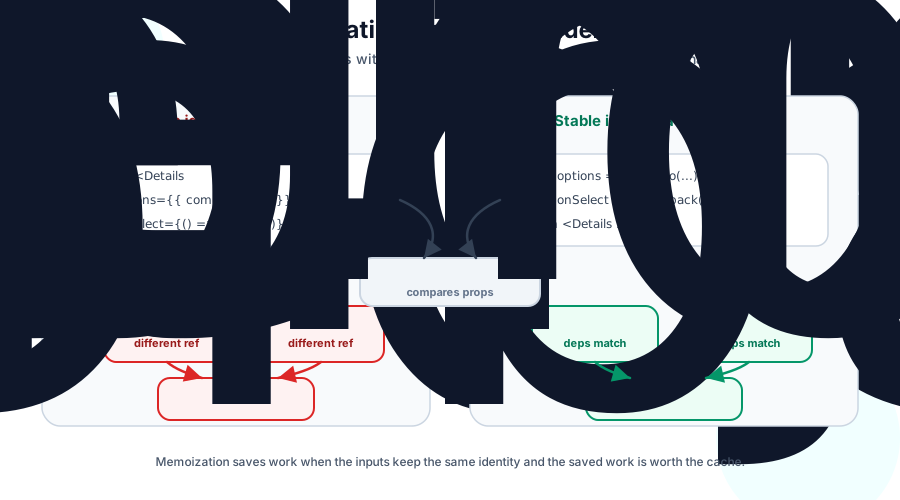
Memoization has a cost. React stores dependencies, compares them, and keeps cached values alive. For cheap components, that bookkeeping can cost more than rerendering. Use manual memoization when you have evidence: slow child renders, large lists, expensive derived data, or props passed into an already memoized child.
Context Crosses Memo Boundaries#
React.memo compares props. It does not hide a component from context changes.
When a component calls useContext(ThemeContext), React records that dependency on the component's fiber. During a later render, if the nearest provider's value changed, React treats the consumer as needing work even when its props compare equal.
const Row = memo(function Row({ item }: { item: Item }) {
  const theme = useContext(ThemeContext);
  return <div className={theme.rowClass}>{item.name}</div>;
});
If ThemeContext.Provider receives a new value, Row can render again because it reads that context. React compares provider values with Object.is, so a provider that creates a fresh object each render can wake up many consumers:
<ThemeContext.Provider value={{ rowClass, accentColor }}>
  {children}
</ThemeContext.Provider>
You can reduce that churn by stabilizing provider values, splitting contexts by update frequency, and moving context reads closer to the components that need them.
const themeValue = useMemo(
  () => ({ rowClass, accentColor }),
  [rowClass, accentColor],
);

return <ThemeContext.Provider value={themeValue}>{children}</ThemeContext.Provider>;
This does not make context free. It gives React a stable value when the actual theme did not change.
React Compiler Automates Many Caches#
Manual memoization works, but it asks humans to track identity throughout a tree. React Compiler moves much of that work into the build step.
React Compiler analyzes components and hooks, tracks data flow and mutation, then inserts cache checks where it can prove a value or JSX subtree can be reused. It can memoize at a finer grain than a hand-written React.memo boundary because it sees values inside a component, not just the props at the component boundary.
For example, this source:
function ProductPage({ product }: { product: Product }) {
  return <Details product={product} compact />;
}
can compile to code that behaves like this simplified pseudocode:
function ProductPage({ product }) {
  const cache = getCompilerCache();

  if (cache[0] !== product) {
    cache[0] = product;
    cache[1] = <Details product={product} compact />;
  }

  return cache[1];
}
The real output is compiler-specific. The idea matters: React can reuse the JSX when the values it depends on did not change. This is not the same as wrapping every component in memo; the compiler can cache values and subtrees inside a component too.
The compiler preserves React's semantics. A state update to a different value still renders the component that owns that state, and a changed context value still reaches its consumers. React can skip a state update whose value is Object.is-equal to the current value, with or without the compiler. The compiler can reuse unchanged values and JSX within a render, but required DOM mutations still cost time. It also depends on React's rules: pure rendering, stable hook order, and no mutation of values React treats as immutable.
The "use memo" directive can force compilation in configurations that require annotations. The "use no memo" directive can opt a function out while you debug. Most applications using the compiler in inferred mode should not need either directive often.
Visualizing React Renders#
React Developer Tools helps you answer which React work happened during an interaction.
Highlight updates when components render marks the page regions associated with components that render. This view is blunt, but useful. If typing in one input lights up a large page section, you have a place to investigate.
The Profiler records commits and shows which components took time. Record the slow interaction, stop the recording, then inspect the flamegraph or ranked view. Look for components that render often or take a large share of a commit.
React Developer Tools can also show why a component rendered, such as changed props, state, hooks, or context. Enable Record why each component rendered while profiling before recording to collect that information. That signal matters more than the render count alone. A component that renders because its own state changed may be fine. A component that renders because a parent passes a new callback on every keystroke may have a fix.
The React Performance tracks in supported browser DevTools separate more phases: Update, Render, Commit, and Remaining Effects. They also label broad priority categories such as Blocking, Transition, Suspense, and Idle. Effect durations appear separately when they are long enough or when they schedule updates. React enables these tracks in development and profiling builds; ordinary production builds omit the instrumentation by default.
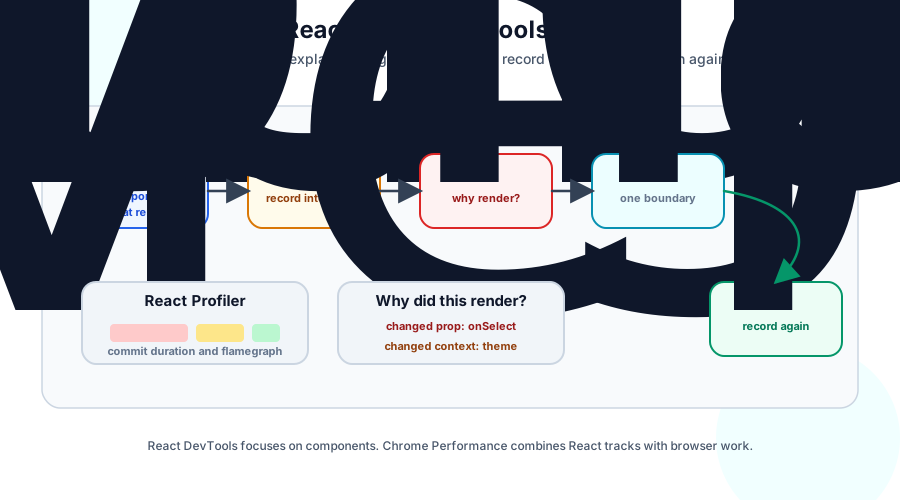
Chrome's Performance panel combines browser work such as scripting, layout, paint, and long tasks with React Performance tracks when they are available. The React Developer Tools Profiler provides a React-focused view of component renders, render reasons, and commit timing.
The best workflow is mechanical:
- Reproduce the slow interaction.
- Record it in React Developer Tools.
- Identify repeated expensive renders.
- Change one boundary, value identity, or context shape.
- Record the same interaction again.
Do not optimize from vibes. A skipped render that saves 0.2 ms is not worth a confusing dependency array. A skipped render that removes 80 ms from each keystroke is worth attention.
Next Up: Renderers#
So far, the series has stayed inside the client-side reconciler: update queues, fibers, lanes, Suspense, and skipped work. The next article follows the commit phase out to the host: One Reconciler, Many Renderers.