React Spring: Motion Between Renders
Part 8 of the React Internals series. Animating through setState re-runs React's render-commit loop every frame; react-spring instead commits a target once and writes intermediate frames straight to the DOM (and, via a separate adapter, to React Three Fiber's scene graph).
Ben Houston • • 8 min read
This is Part 8 of the React Internals series. It builds on React Server Components, which separated server-only component work from the Client Components that hydrate and keep running in the browser.
Say you want a dropdown menu to fade and slide into place instead of snapping open. The visual goal is simple: 60 frames per second of smoothly changing opacity and position between "closed" and "open."
The Problem: Render-Commit Was Not Built for Frames#
React's update loop looks like this: an event schedules an update, React renders components and reconciles elements, React commits host work, the browser paints. That loop is built to turn one state change into one consistent UI snapshot. It is not built to run 60 times a second.
If you drive the menu's position with setState inside requestAnimationFrame, every frame repeats the whole loop: schedule, render, reconcile, commit. For a single element changing opacity and transform, most of that work is wasted. Reconciliation revisits fibers that have not structurally changed. The cost scales with how much of the tree React has to walk to confirm nothing else needs to change, not with how small the visual delta is.
The Solution: Move Frame Writes Outside React#
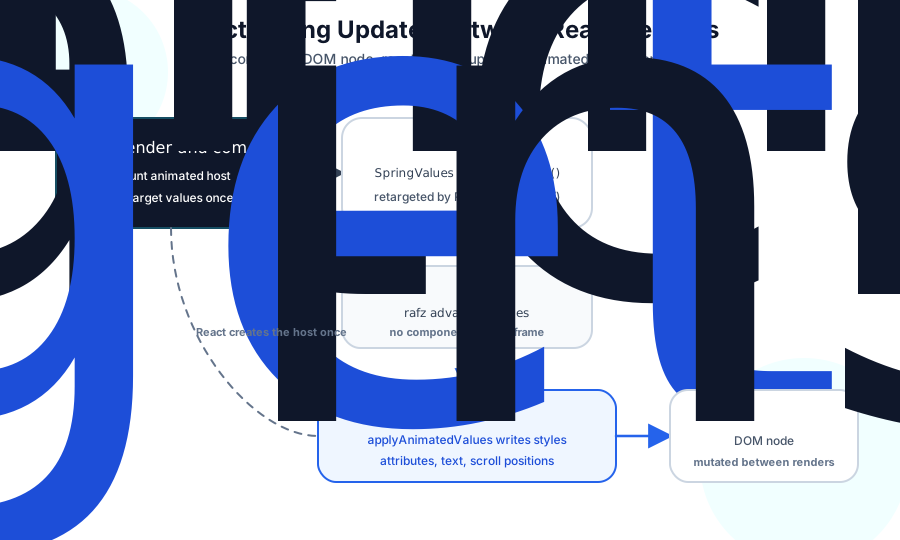
react-spring keeps React in charge of the decision and moves the per-frame work outside React's render path. React still decides that the menu should be open; it commits that target once. react-spring then changes the DOM node's opacity and transform directly across animation frames, without asking React to render again for each intermediate value.
The Web API Shape#
import { animated, useSpring } from '@react-spring/web';

function MenuButton({ open }: { open: boolean }) {
  const [styles, api] = useSpring(
    () => ({
      opacity: 0,
      y: 8,
    }),
    [],
  );

  useEffect(() => {
    api.start({
      opacity: open ? 1 : 0,
      y: open ? 0 : 8,
    });
  }, [api, open]);

  return (
    <animated.div
      style={{
        opacity: styles.opacity,
        transform: styles.y.to(y => `translate3d(0, ${y}px, 0)`),
      }}>
      Account settings
    </animated.div>
  );
}
useSpring returns animated values. animated.div knows how to attach those values to a DOM node. api.start lets an event, effect, or pointer handler retarget the animation without pushing each intermediate value through React state.
React Still Does the Structural Work#
react-spring uses React for everything except the frame-by-frame writes. A component mounts an animated host element, passes it spring values, and starts or retargets the animation when props or events change. After that setup, each intermediate animation frame updates the host instance directly, bypassing render and commit.
The spring itself comes from damped physical motion. That model gives react-spring its fluid feel, especially when you retarget an animation before it finishes. The implementation details of the simulation matter less for React internals than where the intermediate values go: they flow to the host without making React call your component again for every frame.
Animated Values Sit Outside Render#
In React Spring, the useful mental model has four pieces:
useSpringcreates observable animated values and returns them to your component.animatedwraps a host element or a ref-forwarding component.- A frame scheduler named
rafzbatches value advancement and host writes. - A target adapter knows how to apply resolved values to a specific host.
React still owns component lifecycle. If the component unmounts, React Spring stops observing the values for that host instance. If props change the animation target, React runs your component and gives React Spring the next goal. If children appear or disappear, React reconciles and commits the structure.
The per-frame work is different. Animated values notify observers when they change. The animated wrapper schedules an update in raf.write. On that frame, it resolves the current values and asks the web adapter to apply them to the DOM node.
That is the main reason react-spring feels smooth in React applications. It removes React reconciliation from the hot path of the animation. The browser still does style, layout, paint, and JavaScript work. A heavy component tree can stop rerendering while a costly layout can still drop frames.
The official animated elements guide describes this boundary directly: animated components receive SpringValues and update elements without causing a React render. The targets guide explains why each renderer needs an adapter that knows how to apply resolved animated values to its host.
How Web Updates Work#
For @react-spring/web, the host instance is usually a DOM node. The web target creates animated.div, animated.button, animated.svg, and the other web elements with a DOM-specific adapter.
On each animated write, the adapter receives resolved props. It can:
- Set CSS properties, including CSS custom properties.
- Add
pxfor numeric style values that need units. - Set and remove DOM or SVG attributes.
- Update
textContent,className,scrollTop,scrollLeft, andviewBox.
That write does not call your component. It resembles the renderer commit examples from the previous article, but React Spring performs it after commit through a ref to the already-mounted host instance.
The distinction matters. React's DOM renderer owns the committed tree. react-spring does not create a second DOM tree or replace React's reconciler. It mutates properties React already committed, within the animated component's boundary.
The web target wires that adapter into React Spring's host system.
Where React Still Matters#
react-spring avoids per-frame React renders only when it has a host instance it can update.
An animated DOM element has that instance. A custom function component needs to forward its ref to a real host element. If it does not, the animated wrapper cannot perform the native write and may fall back to rendering React on updates.
const Card = forwardRef<HTMLDivElement, ComponentProps<'div'>>(
  function Card(props, ref) {
    return <div ref={ref} {...props} />;
  },
);

const AnimatedCard = animated(Card);
React also remains the right place for durable application state. Use React state to decide whether the menu is open. Use api.start to move the menu across frames. For high-frequency values such as pointer coordinates, avoid feeding every sample through React state unless the rest of the UI needs that value.
The imperative API guide recommends this pattern for animation updates that do not need a React render.
Smooth Does Not Mean Free#
React Spring reduces one class of work: repeated React reconciliation for intermediate animation values. Other costs remain.
In the DOM, animate transform and opacity when you can. Width, height, top, left, and layout-dependent measurements can force the browser to recalculate layout.
Accessibility also belongs in the design. useReducedMotion reads the user's reduced-motion preference and can make React Spring jump to final values instead of animating them. Call it near the application root when you want the preference to affect animations across the app. Preserve the final state; skip the motion, not the information.
React Three Fiber Uses a Different Host#
React Three Fiber already uses React to describe a Three.js scene graph. A <mesh> becomes a THREE.Mesh. A <meshStandardMaterial> becomes a material. Props such as position, scale, and color mutate Three.js objects during commit.
The react-spring API looks familiar in R3F because the spring values and hooks come from the same core. You import from @react-spring/three, use animated.mesh instead of animated.div, and pass spring values to Three.js props. The reason the package exists separately is the host adapter. React Spring needs target-specific code that knows how to write the current animated value to the host instance.
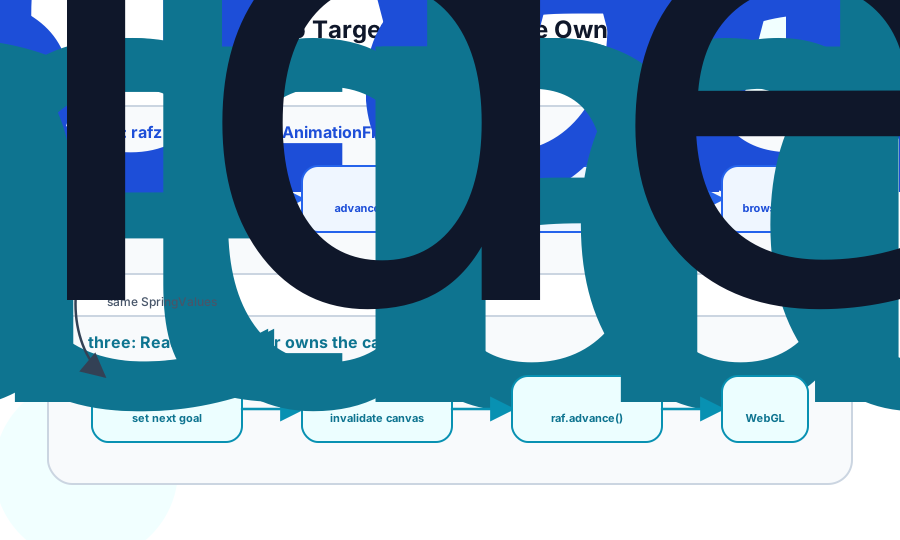
For the DOM, the adapter writes CSS properties, attributes, text, and scroll positions. For React Three Fiber, the adapter delegates to R3F's own applyProps function. That function understands Three.js values: arrays for vectors, Color.set, compatible math-object copies, scalar setters, shader uniforms, and direct object property assignment.
React Three Fiber also owns the canvas frame loop. In the web target, rafz can schedule browser animation frames for itself. In the Three target, React Spring uses demand-driven frame advancement. Pending spring work requests invalidate() from React Three Fiber, and an R3F effect advances rafz before R3F renders the scene.
The motion model is shared. The host writes and frame ownership differ. For Three.js, animate existing object properties instead of recreating geometry, materials, vectors, or scene objects. The R3F performance pitfalls guide makes the same recommendation for frame-loop code.
The React Spring React Three Fiber guide covers the target-specific API, and React Three Fiber's own docs explain how invalidation and frame-loop work fit into a canvas render.