Server-Side Rendering and Hydration
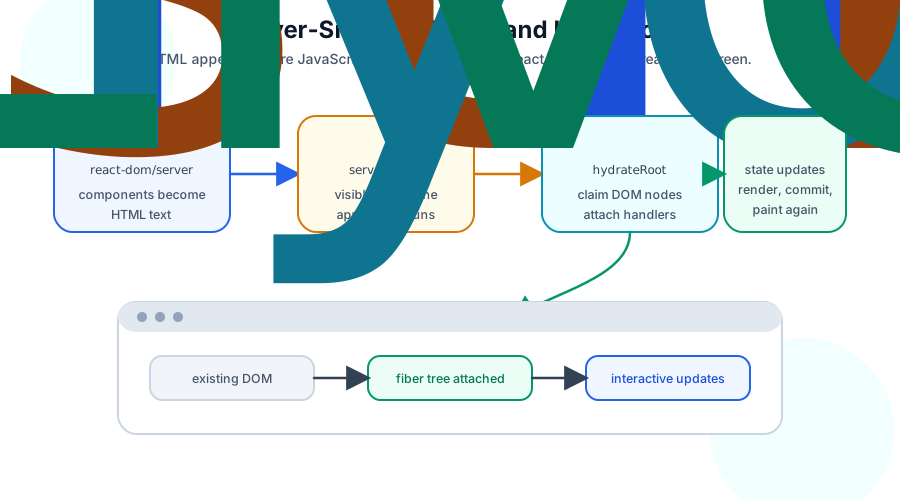
Part 6 of the React Internals series. Server-side rendering creates an initial HTML snapshot on the server; hydration lets react-dom attach event handlers and fibers to that existing DOM instead of replacing it.
Ben Houston • • 7 min read
This is Part 6 of the React Internals series. It builds on One Reconciler, Many Renderers, which showed how the reconciler's host config commits finished work to a target.
Client-side React starts with JavaScript. The browser downloads a bundle, React calls your components, the DOM renderer creates host nodes, and the browser paints the result.
Server-side rendering changes the first step. React calls your components on the server and produces HTML before the browser runs your application JavaScript. The user can see the first screen sooner, crawlers can read real content, and slower devices have less work to do before the page appears.
Hydration is the second half of that story. The HTML from the server is visible, but it is not yet a live React app. In the browser, React builds a fiber tree that matches the already-existing DOM and attaches event handlers to it. It reuses the DOM nodes instead of creating a fresh tree from scratch.
SSR Produces a Snapshot#
The DOM renderer has two sides. react-dom/client is the browser entry point you use with createRoot or hydrateRoot. react-dom/server is the server entry point that turns React elements into HTML.
A simplified server render looks like this:
import { renderToString } from 'react-dom/server';

function Html({ url }: { url: string }) {
  const body = renderToString(<App url={url} />);

  return `<!doctype html>
<html>
  <head>
    <title>Storefront</title>
  </head>
  <body>
    <div id="root">${body}</div>
    <script type="module" src="/client.js"></script>
  </body>
</html>`;
}
React still calls components during render. It still reconciles elements into work. The difference is the host target. Instead of committing DOM mutations into a browser container, the server renderer emits HTML text.
That HTML is a snapshot. It has tags, attributes, text, and placeholders needed by React. It does not contain component functions, hook state machines, event listeners, or a live fiber tree. Those arrive later with the client bundle.
createRoot Builds, hydrateRoot Attaches#
When a purely client-rendered app starts, React owns an empty container:
import { createRoot } from 'react-dom/client';

createRoot(document.getElementById('root')!).render(<App />);
React renders the component tree, creates DOM nodes, inserts them into the container, and commits effects. The user sees React's first screen only after that client work has run.
Hydration starts from a different premise:
import { hydrateRoot } from 'react-dom/client';

hydrateRoot(document.getElementById('root')!, <App />);
The container already has DOM nodes from the server. React renders the same element tree on the client, walks the existing DOM, and matches fibers to nodes. Event handlers become active. Refs point at existing host instances after commit. Effects still run on the client, because effects do not run during server rendering.
The important part is reuse. Hydration is not "render the app and replace the HTML." It is "render the app and attach it to the HTML that is already there."
The First Client Render Must Match#
Hydration relies on the server and client producing the same initial output. If the server renders one tree and the first client render renders another, React has to recover from a mismatch.
This component is a common example:
function Timestamp() {
  return <p>{new Date().toLocaleTimeString()}</p>;
}
The server renders at one time. The browser hydrates later. The text can differ before the user has done anything.
Other mismatch sources follow the same pattern:
- Reading
window,localStorage, media queries, or viewport size during render. - Calling
Math.random()orDate.now()during render. - Rendering locale-dependent output differently on the server and client.
- Returning invalid HTML that the browser parser repairs before React sees it.
The fix is not to hide every dynamic value. The fix is to separate deterministic initial output from browser-only updates. Render the stable version first, then use an effect for client-only data:
function LocalTime() {
  const [time, setTime] = useState<string | null>(null);

  useEffect(() => {
    setTime(new Date().toLocaleTimeString());
  }, []);

  return <p>{time ?? 'Loading local time...'}</p>;
}
The server and the first client render both show the fallback text. After hydration, the effect runs and commits the local time.
Hydration Uses the Same Fiber Ideas#
Hydration does not skip React's internals. It uses them against a different starting point.
React still creates fibers for components and host elements. Hook state still belongs to component fibers. Effects are still collected during render and run after commit. The DOM renderer still owns the host instances.
The difference is the host work. During a normal client mount, React creates host instances:
document.createElement('button');
During hydration, React tries to claim an existing host instance:
document.getElementById('root')!.firstChild;
That is why hydration belongs after the renderer article in this series. It is not a new component model. It is the DOM renderer attaching finished React work to host nodes that already exist.
Streaming Lets HTML Arrive in Pieces#
renderToString waits until the whole HTML snapshot is ready. Modern React server rendering can stream.
In Node, that usually means renderToPipeableStream. In web stream environments, it means renderToReadableStream. The shape differs by runtime, but the idea is the same: React can start sending HTML before the entire tree is finished.
import { renderToPipeableStream } from 'react-dom/server';

const stream = renderToPipeableStream(<App />, {
  bootstrapScripts: ['/client.js'],
  onShellReady() {
    response.setHeader('content-type', 'text/html');
    stream.pipe(response);
  },
});
The "shell" is the part of the page React can send before all Suspense boundaries have resolved. A slow product recommendations panel should not prevent the header, layout, and article body from reaching the browser.
Suspense gives the server renderer boundaries it can reason about. If a subtree suspends during server render, React can stream fallback HTML for that boundary and keep sending the rest of the page. When the suspended content becomes ready, React streams the instructions and HTML needed to reveal it.
Hydration Can Be Selective#
Streaming improves when HTML arrives. Selective hydration improves which parts become interactive first.
The browser may receive a large page with several Suspense boundaries. Hydrating everything in strict document order would be wasteful if the user clicks a button near the bottom before a slow sidebar hydrates. React can prioritize hydration work around the user's interaction so the clicked boundary becomes interactive sooner.
This is the same scheduling story from earlier in the series, applied to hydration work. React still has to finish a consistent commit, but it can choose which units of hydration work matter first.
Suspense boundaries make this coordination possible. They mark regions that can be streamed, revealed, and hydrated independently enough for React to prioritize useful work.
What SSR Does Not Do#
SSR does not make server HTML permanently interactive. Without the client bundle, a React app rendered to HTML can show content, submit plain HTML forms if you built them that way, and follow ordinary links. It cannot run client component state updates, effects, or event handlers.
SSR also does not remove client rendering. Hydration is a client render whose goal is to attach to the existing DOM. After hydration, future updates use the same render, reconcile, commit, and paint cycle covered in the earlier articles.
Most importantly for the next article: SSR is not React Server Components. SSR produces HTML. React Server Components produce a serialized component payload that tells the client how to assemble a tree with server-only and client-interactive parts.
Next Up: React Server Components#
SSR and hydration explain how HTML from the server becomes a live React app in the browser. The next article adds a different server/client split: React Server Components.