AAA Quality on a Web Budget
A AAA game targets a console and ships tens of gigabytes. Three.js runs from one code base on a mid-range phone and ships with a web page. Before choosing techniques, here are the constraints: which APIs, how much memory, and how much memory bandwidth a 60 fps frame can spend.
Ben Houston • • 9 min read
Before looking at how games light a room, this post sets the limits. They decide which techniques are candidates at all, and they are much tighter on the web than on a console.
What a game has that Three.js does not#
A game studio targets known hardware, ships an engine measured in hundreds of megabytes, and can spend a year tuning one renderer for one platform. Three.js works under four constraints a studio does not have:
- It has to run everywhere from one code base, on the majority of phones and desktop computers people own, from a gaming PC to a mid-range phone. This is one of mrdoob's core requirements for the project.
- The code has to be small. It ships to every visitor of every site that uses it.
- The assets have to be small. Nobody waits for a 2 GB download before a web page appears.
- There is no hardware ray tracing. WebGPU does not expose it, and will not on most devices for years. That rules out what the newest engines lean on, from hardware-traced Lumen to the many-light direct lighting of ReSTIR and MegaLights. The pipeline here is the best of the generation before those.
Which APIs#
For this pipeline I am proposing two more constraints, both about the API.
WebGPU first. The pipeline is built for WebGPURenderer only. The maintainers have made clear that WebGPURenderer is the future of Three.js and that the dedicated WebGLRenderer is in maintenance mode, so nothing here is backported to it. WebGPURenderer also has a WebGL 2 backend, and the pipeline supports that backend wherever possible. WebGPU is available on about 87% of devices today, according to Web3D Survey, a site I built to track exactly this, and that number is rising quickly.
No exotic features. Within WebGPU, the pipeline should use only what is built in, or optional features that are close to universal: roughly 97% or more of WebGPU devices on Web3D Survey. Whether to go a little lower depends on how much a feature is worth, but the default is to run with no optional features enabled at all. Where something below that bar is worth having, it is an upgrade with a fallback, never a requirement: RG16 snorm normals fall back to RG16F, and BC6H texture compression, which is mostly a desktop feature, falls back to rg11b10ufloat.
How much memory#
Screen-space techniques are paid for per pixel, so their memory scales with the resolution, not with the scene. The pipeline in Part 4 comes to about 56 bytes per pixel: 16 for a G-buffer of depth, normal, material and motion, and the rest for the beauty target, the temporal history, a depth pyramid and the half-resolution reflection and occlusion buffers.
| Device and render resolution | Pixels | G-buffer | Whole pipeline |
|---|---|---|---|
| Phone, 0.75× of 1170×2532 | 1.7 M | 27 MB | 94 MB |
| Laptop, 1920×1080 | 2.1 M | 33 MB | 116 MB |
| Desktop, 2560×1440 | 3.7 M | 59 MB | 207 MB |
| Desktop, 3840×2160 | 8.3 M | 133 MB | 465 MB |
That fits. A desktop GPU with 8 GB or more barely notices 200–465 MB. A phone with 6–12 GB of shared memory can afford about 100 MB, and phones already render below native resolution, which is what makes the phone row realistic.
Sixteen bytes per pixel for the G-buffer is lean by AAA standards. Deferred engines commonly spend 20–28, because they also store base color, emissive and baked lighting. Three.js renders forward, so its G-buffer only needs what the screen-space passes read.
The cached lighting is the other large consumer. A 4096² lightmap is 134 MB as half-float. Encoded to BC6H, the GPU's compressed HDR format, it is 17 MB, and where BC6H is not available rg11b10ufloat halves it instead. Reflection probes are kept small for the same reason: a 128² probe takes a quarter of the memory of a 256² one, and is plenty for the blurry reflections left over once screen-space reflections handle the sharp ones.
How much memory bandwidth#
The tighter budget is bandwidth rather than capacity. At 60 fps a frame has 16.7 ms, and every screen-sized buffer is written once and then read several times within it. To see what that adds up to, I modeled the texture traffic of a whole frame: every texel read and every write, pass by pass, at 1920×1080 and 60 fps.
| Stage | Bytes per output pixel | GB/s at 60 fps |
|---|---|---|
| G-buffer prepass | 22 | 2.7 |
| Hi-Z build | 7 | 0.8 |
| GTAO and its filter, at half resolution | 31 | 3.9 |
| SSR trace, at half resolution | 67 | 8.3 |
| SSR temporal and spatial denoise, at half resolution | 63 | 7.8 |
| Upsample to full resolution | 88 | 10.9 |
| Forward beauty pass | 76 | 9.5 |
| Transparents and glass | 23 | 2.9 |
| TRAA | 36 | 4.5 |
| Sharpen, tone map and output | 12 | 1.5 |
| Full pipeline | 424 | 52.8 |
| Baked lighting only | 123 | 15.3 |
The model assumes one SSR ray per pixel with 32 depth fetches, 16 depth taps for GTAO, and glass over a quarter of the screen. SSGI and live shadows are not included and add their own traffic. "Baked lighting only" is a single forward pass that reads lightmaps and reflection probes, with spatial anti-aliasing and no screen-space effects.
These are logical texture reads and writes, not measured DRAM traffic: caches and tile memory absorb part of it. The proportions are what matter, and they shaped the plan.
- The screen-space effects cost more than the shading. The full pipeline moves about 3.5 times the bytes of the baked-only frame, and two thirds of it is spent before a single material is shaded.
- Full-resolution SSR is out of reach. Tracing and denoising SSR at full resolution, not half, adds another 48 GB/s, which nearly doubles the frame. So SSR, its denoiser and GTAO run at half resolution, which quarters what they read and write, and their results are upsampled with a depth- and normal-aware filter so they do not bleed across the edges of objects.
- Resolution is the largest lever. Traffic scales with pixels and with frame rate. At 4K and 60 fps the baked-only frame is 61 GB/s and the full pipeline is 211 GB/s. That is why the whole frame renders below the output resolution and is reconstructed over time by a temporal upscaler (TAAU). Of the 56 bytes per pixel of memory, about 40 scale with the render resolution; the history and resolve targets, about 24 bytes, are per output pixel. At a resolution scale of 0.5 that is 34 bytes per output pixel instead of 56: a 4K frame drops from 465 MB to about 280 MB, and shades a quarter of the pixels.
- The pipeline has to come in tiers. A recent mid-range phone has 50 GB/s or so of memory bandwidth for everything it does. The baked-only frame fits easily. The full pipeline at native resolution and 60 fps does not. So the caches, lightmaps, light probes and reflection probes, are the base that runs everywhere, and the screen-space stages are added where the device can afford them. This is why every stage is opt-in.
How much download#
A game installs once; a web page downloads every time. That constrains both the code and the assets.
- Code. The large majority of the pipeline lives in the addons under
examples/, and every stage is opt-in, so a site ships only the stages its scene uses. - Lightmaps and environment maps. They need HDR, which rules out PNG, and EXR or HDR files are large. UltraHDR JPEG works in every browser today, and JPEG XL compresses better as browser support arrives.
- Baked lighting that is never downloaded. The baker runs in the browser, in the renderer that draws the frame. A scene can ship its geometry and lights and compute its lightmaps and probes on load, in seconds.
What we measured first#
The budgets above are models. Before choosing techniques I also measured what Three.js already had, with two suites. A fidelity suite renders the same scene with each Three.js lighting technique and with two path-traced references, three-gpu-pathtracer and Blender Cycles, and scores every render with PSNR and a delta heatmap. A performance suite measures scene load, precalculation cost and sustained frame rate. Both are built on fidelity-kit, and both ran on real GPUs across the range: an NVIDIA GTX 1050 and RTX 3060, the integrated graphics of an AMD Ryzen 7 5800H, and an Apple M3.

One scene across the techniques, each scored against the path-traced reference. Brighter delta means more error.
This is what the two suites found in September:
| Technique | Against the reference | Performance |
|---|---|---|
| SSR | Sharp reflections by default; stochastic GGX gave roughness but also noise. Added on top of the image, so the environment reflection was counted twice | Very slow at full resolution: weak denoising forced it to oversample, and it had no Hi-Z acceleration |
| SSGI | Too dark; ignored metalness and integrated emissive incorrectly | Very slow as the GI for a whole scene, even on high-end machines: a high trace count and no effective denoising |
| Light probes | Light leaked through walls; back faces rendered black | Cheap at runtime, but very slow to bake, even for small grids |
| VXGI | Extensive light leaks; too dark, losing energy; back faces rendered black | Slow |
Three conclusions came out of that.
- Full-screen SSR and SSGI cannot be the whole answer. Carrying all of a scene's reflections or bounce light with screen-space rays, at full resolution, was not performant on any of the test machines. They stay in the pipeline in a smaller role: the first stage of a cascade, at half resolution, with one ray per pixel and a real denoiser, in front of cached lighting that answers everything they miss.
- Light probes are the right base, once they bake quickly. They were the cheapest technique at runtime and the slowest to set up, so bake speed was the first thing fixed. It is now about eight times faster; Part 4 has the details.
- Trace volumes are not ready to be the default. VXGI was slow and leaked. I also prototyped two alternatives. Virtual point lights, also known as instant radiosity, place small shadowed lights where light bounces; they leak less, but handle only static geometry and are noisy at low budgets. Radiance cascades, built on the VXGI voxel scene, let off-screen geometry contribute without temporal accumulation, but lose thin geometry at coarse voxel resolution. Both remain experiments.
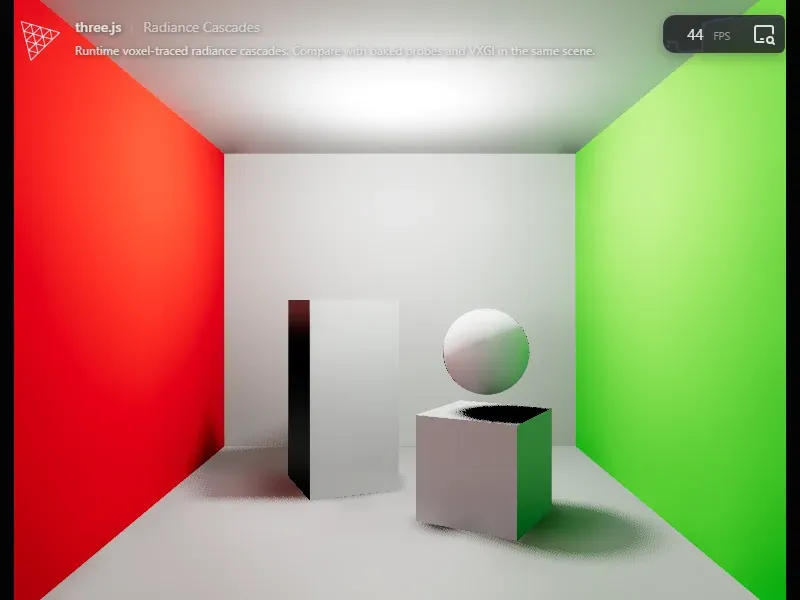
The radiance cascades prototype: bounce light traced through a voxel copy of the scene.
How the measuring is done is in the bonus post, Making Effective Three.js Improvements.
What the constraints rule in#
Taken together, the limits point at one family of techniques:
- No hardware ray tracing means bounced light has to be either computed ahead of the frame and cached, or found in screen space.
- A per-pixel budget of about 56 bytes of memory, and a bandwidth budget a phone can exceed, mean a lean G-buffer, half-resolution effects, temporal upscaling and tiers.
- A small download means compressed HDR textures and baking in the browser.
That is the generation of game rendering just before real-time ray tracing, and it is very well documented.