Making Effective Three.js Improvements
Screen-space rendering is nearly impossible to debug in a finished frame, and review time is the scarcest resource in an open source project. Here is how the lighting pipeline work for Three.js is tested and proposed: a debug harness for each stage, and small, opt-in pull requests.
Ben Houston • • 6 min read
The pipeline in this series is not one change. It is a long list of pull requests to Three.js, opened over two months, and many of them are already in. Review time is the scarce resource in a project like Three.js, so the question for each one is how to make it easy for a maintainer to say yes. These are the habits that have worked.
Measure before you build#
The work did not start with a pull request. It started with measurement: a fidelity suite that renders one scene with each Three.js lighting technique and scores it against path-traced references, and a performance suite that reports load time, setup cost and sustained frame rate. Part 2 has what they found. Those findings chose the plan: which techniques were wrong, which were too slow, and what to fix first.
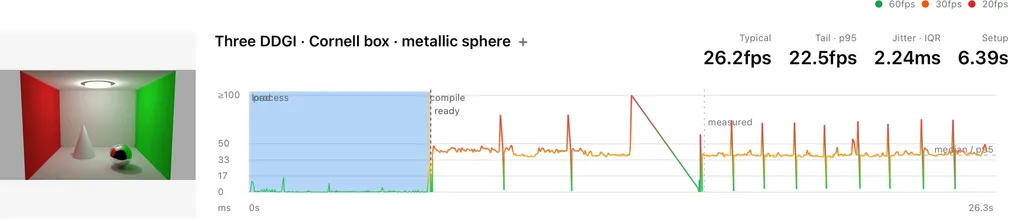
One performance report: typical and tail frame rates, jitter and setup time, with the frame timeline underneath.
Performance numbers are only worth quoting when they are measured carefully:
- On real GPUs. Hardware WebGPU on NVIDIA, AMD and Apple devices, never a software rasterizer, and on machines that are not also running a development environment.
- As sustained throughput. Turn off vsync and frame-rate caps, warm each implementation up, run it for several seconds, and count the frames the GPU completed. Timing individual frames is inaccurate and adds its own overhead.
- For the whole frame. A faster trace only counts if the complete pipeline is faster at the same image quality. The Hi-Z prototype in Part 4 is the example: its traversal is faster, but building the pyramid costs more than the traversal saves, so the honest result is no speedup yet.
- In motion as well as at rest. A still image hides ghosting, flicker and lag, so a second suite scores moving scenes.
Debug harnesses, not hope#
Some of the most valuable work on the pipeline has not been rendering features at all, but debug harnesses: small examples that test one stage in isolation, against a known answer.
The reason is that screen-space techniques are nearly impossible to debug in a real scene. By the time an SSR result reaches the screen, it has been traced, denoised, reprojected, pushed through the BRDF, added to everything else and anti-aliased. If the reflections look a little blotchy, which stage is at fault? Looking at a finished frame and tweaking parameters is mostly hoping it works.
So each stage gets its own harness:
- Noise. The noise smoothing harness, added with Houston Stratified Noise, feeds a noise function through the same kind of spatial blur and temporal accumulation a real effect uses, and shows how quickly each noise function reconstructs a smooth result. That is the question that actually matters, and it is how we chose the noise for SSR.
- Denoising. The denoiser harness, which I opened this week, takes a known image and samples it the way SSR does: sparse, spatially jittered samples, with an adjustable coverage level to imitate rays that miss. It feeds those samples through the spatial and temporal denoiser and compares the result with the original image, with an error view showing where it is too bright or too dark.
- Anti-aliasing. The TRAA harness, drafted and not yet submitted, compares TRAA with an unjittered 4× supersampled reference under isolated motions: static, pans, orbit, yaw, roll, dolly, zoom, sub-pixel drift and moving objects. It reports PSNR for each, with a delta view and controls for every TRAA parameter.
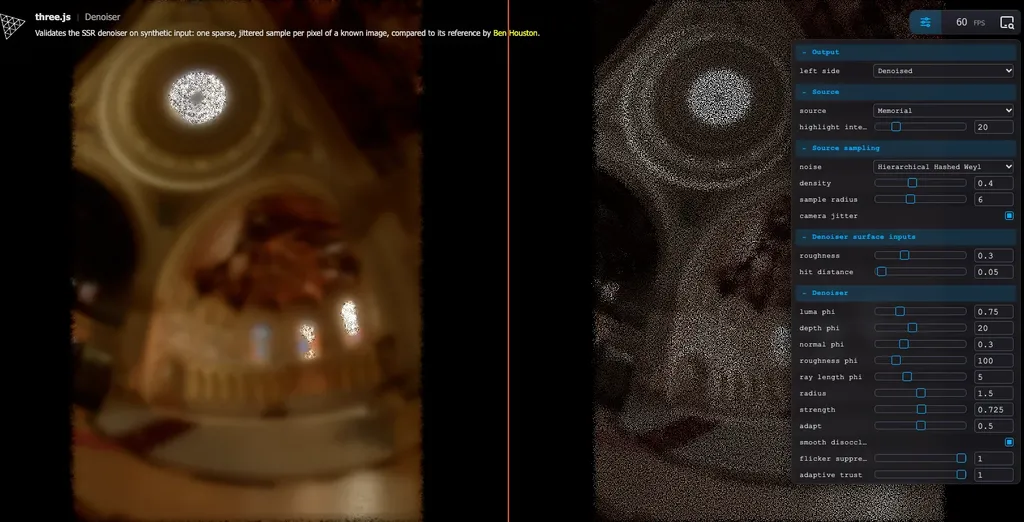
The denoiser harness: the reconstructed image (left) and the sparse, jittered samples it was built from (right).
With a known reference, a denoiser change is either measurably better or it is not, and it can be tuned before it ever touches a reflection.
The harnesses are just as useful for review. A reviewer does not have to take a before-and-after screenshot on trust, or judge a subtle difference by eye in a busy scene: they can open the harness and see the error against a known answer. The aim is for each screen-space stage in this pipeline to arrive with one.
Start from what shipped#
Three.js adopts techniques rather than inventing them, and that makes a change easier to review. Each stage in Part 4 points at a game that shipped it and a talk or paper that describes it. A reviewer who doubts a design choice can read why DOOM or Frostbite made it, and does not have to take my word.
Build where the project is going#
My first attempt at this pipeline was for WebGLRenderer: a G-buffer pass that preserved material detail, reflections inside the material lighting, material-aware ambient occlusion and TRAA. All four were closed without merging. The maintainers preferred to invest in the node-based WebGPURenderer rather than the older WebGL post-processing stack. The designs carried over to the work in this series; the code did not. Ask where a project is heading before writing for it.
Keep the default unchanged#
A single object under an environment map has to render exactly as it does today, at the same cost. Every stage of the pipeline is opt-in, and the proposal in Part 6 goes as far as testing that its default path is untouched. A change that cannot make an existing scene worse is a much smaller thing to approve.
Stay in the addons#
The large majority of the pipeline lives in the addons under examples/. Changes to the core in src/ are kept to the minimum necessary. Of the nine steps proposed in Part 6, only four touch src/. Core code ships to every user of Three.js and is maintained for good, so it gets the most scrutiny; an addon is paid for only by the sites that import it.
Send small pull requests#
Each piece has been proposed on its own: octahedral normals, cube array sampling, previous-frame tracing, one harness. The rule is one technique, one pull request, one example. Each is useful alone and can be reviewed in one sitting. Prototypes go up on my fork first, and are proposed to Three.js in dependency order once they work. Part 6 is planned the same way, as nine steps that each stand up without the ones after them.
Show the whole picture#
Small pull requests have a cost: nobody is asked to sign up to the whole, and a reviewer cannot see where a piece is heading. That is what this series is for. For a change as large as pluggable indirect lighting, the order is reversed: the design is written up first, and the pull requests come after there is agreement on its shape.
Let the maintainers reshape it#
Michael Herzog (@Mugen87) has reviewed most of these pull requests, and more than once has reworked one into a better design that fits how Three.js as a whole is built. That is the review working, not a setback. The maintainers know the renderer's internals and its future better than a contributor does, and a pull request that arrives open to being reshaped ends up better than the one that was submitted.